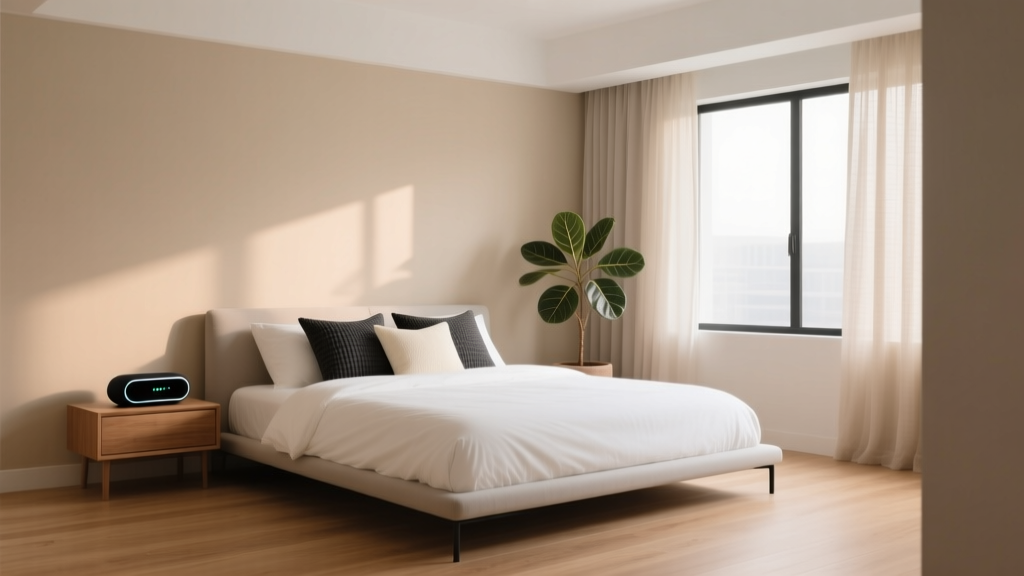
Best Bedroom Sleep Tracking Device Spot - The Decor Mag
Sleep tracking can be a powerful tool—when it’s used gently. The right data can help you understand patterns in your sleep quality, identify what’s disrupting your rest, and make small bedroom design changes that add up to a calmer, more restorative night. The challenge is that a sleep tracking device can also become a new source of stress if it’s placed poorly, shines light into your eyes, runs hot, or invites you to check your stats at 2 a.m.
Finding the best bedroom sleep tracking device spot is less about “perfect placement” and more about designing a sleep-friendly environment where technology supports wellness instead of competing with it. With a few smart layout choices—plus the right lighting, furniture, and charging setup—you can track sleep without sacrificing the soothing feel of your bedroom decor.
This guide covers ideal locations for common sleep trackers, practical bedroom layout tips, and design-forward solutions for keeping devices out of sight (and out of mind) while you rest.
Why device placement affects sleep quality
Bedrooms work best when they encourage a single message: relax. Where you put a sleep tracker can either reinforce that message or disrupt it. The most common placement-related issues are surprisingly simple:
- Light exposure: indicator LEDs, charging lights, and phone screens can interfere with melatonin and make it harder to fall asleep.
- Noise and vibration: buzzing notifications, subtle fan noise, or a tracker vibrating on a hollow surface can wake light sleepers.
- Heat and airflow: devices that run warm near bedding can create discomfort and reduce perceived sleep quality.
- Clutter and anxiety: a messy nightstand full of tech cues your brain to stay alert rather than unwind.
- Signal accuracy: many trackers rely on proximity and stability; poor placement can lead to inaccurate sleep data.
A calm bedroom design supports consistent sleep. That means the best spot for a tracker is one that’s accurate and visually quiet.
Start with your tracker type: where it works best
Different product types need different placement. Use the recommendations below as a baseline, then adjust based on your room layout, your sleep position, and your tolerance for light/noise.
1) Wearable trackers (rings, watches, bands)
Best spot: on your body, plus a designated charging spot that isn’t visually loud.
- During sleep: wear as directed for best accuracy (heart rate, HRV, movement, temperature trends).
- Charging location: a low-profile charging tray or a drawer charging station near the bed.
Design tip: Choose a nightstand with a lower shelf or drawer so the charger isn’t the first thing you see at bedtime.
Budget range:
- Charging tray/valet: $15–$60
- Nightstand with drawer: $120–$450 (renter-friendly options often sit in the $120–$250 range)
2) Under-mattress or under-sheet sensors
Best spot: centered under the mattress at chest level (or per manufacturer guidance), away from bed frame slats that shift.
- Place on the side you sleep on most often.
- Keep cables routed along the bed frame, secured with fabric cable clips.
- Avoid placement near an adjustable bed motor unless the sensor is designed for it.
Bedroom layout benefit: These trackers keep tech off the nightstand, which helps the bedroom feel less like a “device zone.”
Budget range: $80–$300 depending on features (sleep stages, breathing rate, smart alarm, app coaching).
3) Bedside radar/contactless sleep trackers
Best spot: on a stable surface next to the bed, roughly mattress height, with a clear line of sight to your torso.
- Position 8–24 inches from the mattress edge (check your model).
- Keep it away from moving curtains, ceiling fans that wobble, and pets that jump on the nightstand.
- Angle the device toward your upper body for better respiratory and movement sensing.
Decor tip: Choose a nightstand with a wide top and a lidded catchall to visually “quiet” cords and accessories.
Budget range: $150–$400.
4) Phone-based sleep tracking (apps + phone sensors)
Best spot: not on the bed and not under your pillow.
- Place the phone on a stable nightstand face down to reduce light, or in a drawer with ventilation.
- Enable airplane mode (or at least Do Not Disturb) to prevent notifications and reduce radio chatter.
- If using sound-based tracking, keep the phone 1–3 feet from your head—close enough to hear breathing, far enough to reduce screen temptation.
Wellness note: If you find yourself checking sleep stats compulsively, consider switching to a passive tracker (under-mattress or wearable) and keeping your phone across the room.
Budget range: $0–$30 for apps; $20–$80 for a calming charging solution that reduces clutter.
The best sleep tracking device spots (ranked for most bedrooms)
Spot #1: A drawer-based charging station in your nightstand
This is one of the most sleep-friendly options for renters and homeowners because it keeps the bedroom decor serene while maintaining convenience.
- Ideal for: wearables, phone charging (if you can keep it out of sight), small bedside trackers with dimmable LEDs.
- Why it works: less visual clutter, less temptation to check screens, fewer stray LED lights.
How to set it up:
- Choose a nightstand with a deep drawer or add a drawer insert.
- Use a compact power strip with surge protection (look for a flat plug).
- Drill-free cable management: adhesive cable clips along the back panel.
- Add a felt or cork liner to prevent buzzing/vibration against wood.
Materials that feel calm: light oak, walnut veneer, rattan fronts, or matte-painted wood (warm white, greige, muted taupe).
Budget range: $25–$60 for accessories; $120–$450 for a nightstand upgrade.
Spot #2: Under-mattress at chest level (for sensor pads)
If you want the lowest-tech visual impact, an under-mattress tracker is hard to beat.
- Ideal for: people who dislike wearing devices, minimalists, design-forward bedrooms.
- Why it works: no nightstand glow, no visible cords, no bedside clutter.
Placement tips for accuracy:
- Center the sensor where your ribcage rests most nights.
- Use a non-slip rug pad strip between sensor and bed frame if shifting occurs.
- Keep thick memory foam toppers in mind—they can dampen signal on some sensors.
Spot #3: Bedside table, mattress height, with LED management (for contactless devices)
Bedside radar trackers can be very accurate when positioned well, but they need thoughtful styling to stay sleep-friendly.
- Ideal for: couples (some models can track two sleepers), those who want detailed breathing/movement data without wearing a device.
- Why it works: consistent placement and line-of-sight improves tracking.
Make it bedroom-decor friendly:
- Place the tracker behind a small object that doesn’t block its sensor field (a low book stack can work if it’s not in front of the sensing area).
- Use black electrical tape or light-dimming stickers on bright indicator LEDs (only if it doesn’t cover vents or sensors).
- Choose a nightstand lamp with a warm bulb so your eye isn’t drawn to device lighting.
Spot #4: Across the room on a dresser (best for reducing phone temptation)
If your “sleep tracking device” is mainly your phone, moving it away from the bed is often the biggest upgrade to your sleep environment.
- Ideal for: light sleepers, doom-scrollers, anyone trying to break late-night screen habits.
- Why it works: physical distance reduces impulsive checking, while still capturing broad sleep windows for basic tracking.
Design tip: Put the phone on a dresser tray next to a soft-glow lamp and a book—create a wind-down vignette that signals rest.
Bedroom design recommendations that support sleep tracking (and better sleep)
Nightstand setup: calm surfaces, fewer cues
A well-styled nightstand improves your sleep environment and makes device placement feel intentional rather than cluttered.
- Choose a larger nightstand top (18–24 inches wide) to prevent crowding.
- Use a lidded box (linen, leatherette, or matte wood) to hide chargers and small tech.
- Add one calming object: a small ceramic dish, a vase with dried stems, or a book.
Budget ranges:
- Lidded storage box: $20–$80
- Decor tray: $15–$60
- Nightstand lamp with warm bulb: $30–$200
Lighting: warmer, dimmer, and positioned for comfort
Light is one of the most direct links between bedroom design and sleep quality. If your tracker requires a bedside setup, good lighting prevents harsh contrasts and reduces attention to device LEDs.
- Bulb temperature: 2200K–2700K (warm amber to warm white).
- Dimming: use a dimmable lamp or plug-in dimmer for bedside lighting.
- Avoid: bright overhead lights within 1–2 hours of bedtime.
Product types that work well: frosted-globe bulbs, linen-shade lamps, wall sconces with warm LEDs (great for small bedrooms and renters using plug-in versions).
Bedding and materials: reduce noise, heat, and irritation
Sleep trackers can help you understand temperature and restlessness trends, but your bedding does most of the heavy lifting.
- Sheets: long-staple cotton percale for cool sleepers; cotton sateen for a softer, slightly warmer feel.
- Duvet insert: choose all-season with breathable cotton shell; consider wool fill if you run hot/cold in swings.
- Mattress protector: look for quiet, breathable materials (avoid crinkly plastic-feel protectors).
Budget ranges:
- Quality sheet set: $60–$220
- All-season duvet insert: $80–$250
- Breathable protector: $30–$100
Color and visual calm: a backdrop that lowers stimulation
The best sleep tracking device spot is easier to maintain when the room itself feels restful. Soft colors reduce visual “noise,” making your tracker less prominent.
- Best bedroom colors for relaxation: warm white, oatmeal, soft greige, muted sage, dusty blue, clay-beige.
- Finishes: matte or eggshell walls reduce glare compared to glossy paint.
- Textiles: layer linen, cotton, and wool textures for a cocooned look without heavy visual clutter.
Layout: keep tech away from the bed’s “rest zone”
Even if you track sleep, your bed should still feel like a place for rest—not a workstation.
- Keep laptops and work chargers out of the bedroom if possible.
- Create a charging zone (nightstand drawer or dresser corner) and a separate rest zone (bed + calming light + book).
- If space is tight, use a slim bedside shelf with hidden cable routing instead of piling items on the mattress or floor.
Sleep-friendly wellness tips when using sleep trackers
- Set “data hours”: review sleep stats in the morning or midday, not at bedtime.
- Turn off non-essential notifications: your tracker should record sleep, not interrupt it.
- Prioritize consistency over perfection: a steady wake time and wind-down routine often improves sleep more than chasing ideal metrics.
- Use your bedroom cues: dim lights, lower temperature slightly, and keep surfaces tidy to encourage your nervous system to settle.
If tracking makes you anxious, simplify: track fewer metrics, hide the app icon, or take breaks. Better sleep quality comes from a supportive sleep environment, not constant monitoring.
Common mistakes to avoid
- Sleeping with your phone under your pillow: heat, discomfort, light leaks, and the temptation to check it can sabotage rest.
- Placing a tracker on a wobbly nightstand: movement can distort readings and create rattling noise.
- Ignoring LED lights: small indicator lights can still be disruptive in a dark bedroom.
- Letting cords sprawl: cable clutter adds stress visually and can be a tripping hazard.
- Tracking everything at once: too many devices and apps can lead to overthinking and poorer sleep.
- Positioning contactless trackers behind tall objects: blocked sensor paths often equal unreliable data.
FAQ: Bedroom sleep tracking device placement
Where should I put a sleep tracker in a small bedroom?
Use a nightstand drawer charging setup or an under-mattress sensor to reduce visual clutter. If you rely on your phone, place it on a dresser or wall shelf a few feet from the bed and keep it face down with Do Not Disturb enabled.
Is it okay to keep a sleep tracking device on my nightstand?
Yes, if the surface is stable and you manage light and notifications. Choose warm bedside lighting, dim or cover bright LEDs (without blocking sensors), and route cables neatly to keep the bedroom decor calm.
What’s the best spot for an under-mattress sleep tracker?
Typically under the mattress around chest level on your primary sleeping side. Keep it flat and secure so it doesn’t shift, and follow your device’s distance guidance if you use a thick topper.
Should I keep my phone across the room while tracking sleep?
If screen temptation affects your sleep, yes. You’ll reduce late-night checking and light exposure. Many people find their sleep improves simply by moving the phone away from the bed and using a simple alarm clock.
How can I hide cords and chargers without buying new furniture?
Use adhesive cable clips along the back edge of the nightstand, a slim power strip with a flat plug, and a lidded linen or wood box to conceal charging clutter. A felt liner can reduce vibration noise inside a drawer.
Actionable next steps for a calmer, more accurate setup
- Identify your tracker type (wearable, under-mattress, bedside contactless, or phone-based) and choose the placement that matches its sensing needs.
- Reduce bedroom light noise with warm bulbs (2200K–2700K), dimmers, and covered indicator lights.
- Create a dedicated charging zone—ideally in a drawer or on a dresser tray—so your nightstand stays visually restful.
- Refine your sleep environment with breathable bedding, tidy surfaces, and a simple wind-down routine that doesn’t revolve around screens.
Your bedroom design sets the stage for sleep quality, and the best sleep tracking device spot is the one that supports that calm—accurate enough to be useful, quiet enough to disappear.
For more soothing bedroom decor ideas, practical layout tips, and sleep-friendly styling inspiration, explore the latest guides on thedecormag.com.
More Articles
 Bedroom Limewash Ceiling Treatment Idea - The Decor Mag
 Best Bedroom Herbal Tea Bedside Setup - The Decor Mag
 How to Choose Bedroom Comforter Fill - The Decor Mag
 Bedroom Fluted Nightstand Design - The Decor Mag
 Natural Bedroom Materials: Stylish Ideas for 2026
 Best Bedroom Bedside Hydration Station - The Decor Mag
 Bedroom Retreat: Decor Ideas for 2026
 Best Bedroom Memory Display Shelf - The Decor Mag
 Bedroom Fluted Wood Bed Frame Trend - The Decor Mag
 How to Choose Bedroom Pillow Insert Fill - The Decor Mag